
Step 1: Login to Kite Developer Console
Head to https://developers.kite.trade and log in using your Zerodha credentials.

Step 2: Create a New App
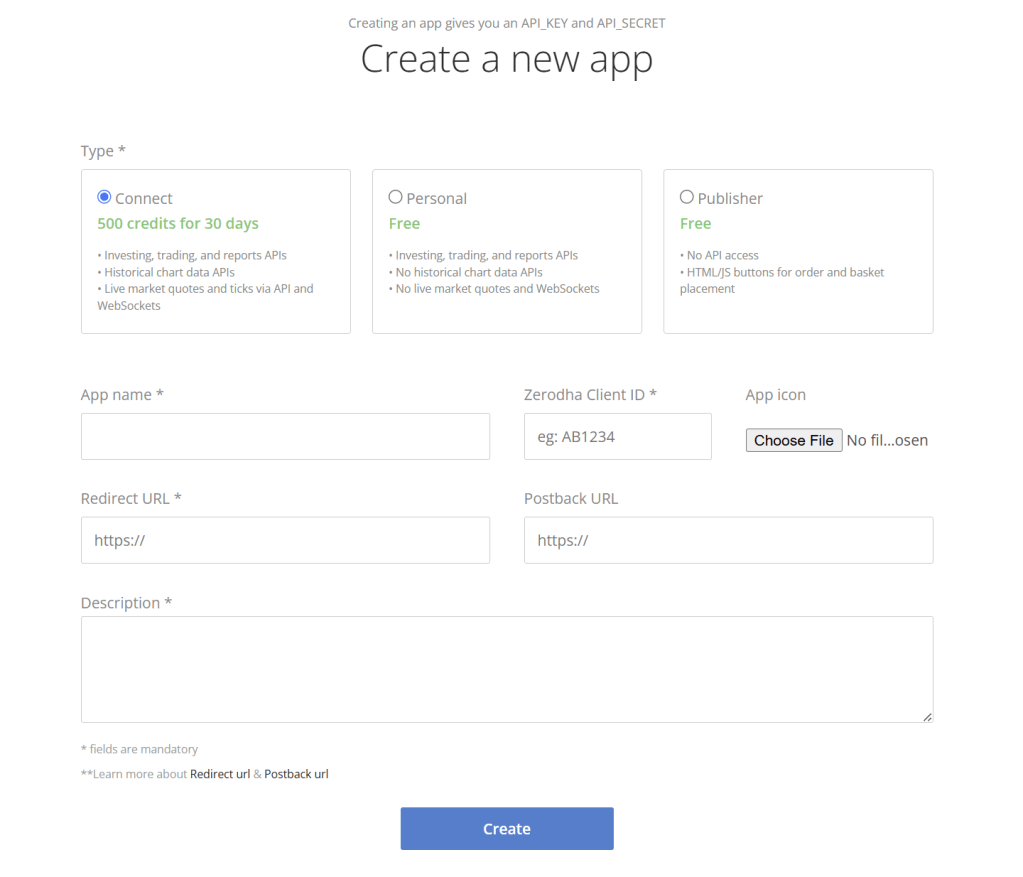
Click on Create new app

Once logged in:
Once logged in:
- Click on Create new app
- Choose the Connect option (this allows access to live market data and APIs)
- Fill in the required details:
Example Configuration:
- App Name: TestApp (or any name you like)
- Zerodha Client ID: Your trading account client ID
- Redirect URL:
https://kite.trade/ - Description: Historical and tick data stream
Then click Create
Step 3: Save Your API Key & Secret
After creating the app:
- Return to the developer home page
- You’ll see your app listed with its API Key
- Click Show API Secret and note both API Key and Secret down safely in a text file.
⚠️ Do not share these with anyone — they’re your private credentials for API access


Step 4: Understand the 4 Credentials You’ll Need
To fetch real-time and historical data, you’ll need:
- API Key (from your app)
- API Secret (from your app)
- Zerodha Client ID (your login ID)
- Access Token (a temporary token generated daily)
The Access Token is required for authentication and needs to be refreshed once a day.
Step 5: Generate Your Access Token
Use the URL below to log in and get your session key:
https://kite.trade/connect/login?api_key=YOUR_API_KEY
After logging in, the URL will redirect and display your request token.
Step 6: Use Python to Generate and Save the Access Token
from kiteconnect import KiteConnect

api_key = 'YOUR_API_KEY'
api_secret = 'YOUR_API_SECRET'

kite = KiteConnect(api_key=api_key)

session_key = input("Session Key: ")  # Paste the request token from step 5

a = kite.generate_session(session_key, api_secret)
access_token = a.get("access_token")

with open(r'C:\Trading\AccessToken.txt', 'w') as txt:
    txt.write(access_token)
This script:
Saves it to a .txt file so you can reuse it across your Python scripts for the rest of the day
Logs in using your request token
Generates an Access Token
Final Notes
- Remember, Access Tokens expire daily. You’ll need to run this once a day to fetch a new one.
- Avoid sharing your API Key, API Secret, or Access Token
- Keep your redirect URL consistent and bookmark it as https://kite.trade/connect/login?api_key=YOUR_API_KEY
- You can now fetch both historical data and real-time tick data via the KiteConnect API and WebSocket.
Need Help?
I’m always around to help via email. If you get stuck at any step, just reach out — websites can explain only so much, and sometimes a real human helps faster!
 Dad Quant