
Why Save OHLC Data from Yahoo Finance?
OHLC (Open, High, Low, Close) data is the backbone of quantitative finance, trading, and investment research. Freely available and historically rich, it’s essential for backtesting strategies, analyzing market behavior, and developing data-driven trading systems.
What Can You Do with Daily OHLC Data?
From basic charting to advanced AI models, OHLC data unlocks a wide range of possibilities:
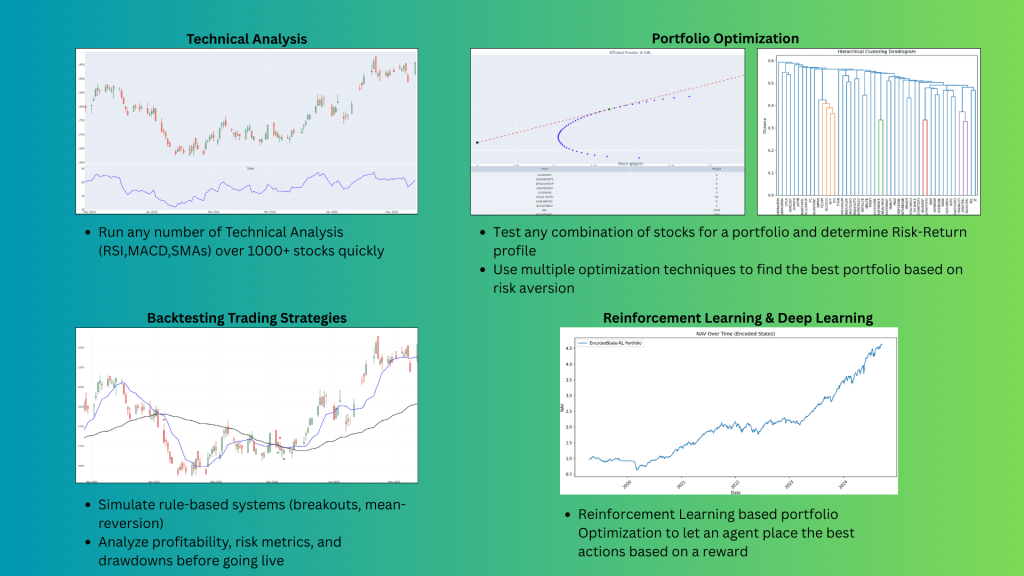
1️⃣ Technical Analysis
- Identify trends, support/resistance, and price patterns.
- Calculate moving averages (SMA, EMA) and indicators like RSI, MACD, and Bollinger Bands.
2️⃣ Backtesting Trading Strategies
- Simulate rule-based systems (breakouts, mean-reversion).
- Analyze profitability, risk metrics, and drawdowns before going live.
3️⃣ Statistical & Machine Learning Models
- Engineer features like returns, volatility, and ranges.
- Train ML models for direction or return prediction.
- Use unsupervised learning for clustering, anomaly detection, or regime shifts.
4️⃣ Portfolio Optimization
- Compute correlations and covariance matrices.
- Build efficient portfolios using Modern Portfolio Theory (MPT) or Black-Litterman models.
5️⃣ Reinforcement Learning & Deep Learning
- Train RL agents to learn trading policies from market environments.
- Use LSTM/GRU models for sequential price forecasting and multi-asset allocation.
Before we get to the code, its important to know how we’re getting the data and then storing it.
Step 1: We start with getting a list of stock tickers(identity for each stock) from the market we’re interested in. For NSE(India), we get it from https://www.nseindia.com/market-data/securities-available-for-trading you can download the csv file for equities available for trade. This would be more than 2000 stocks. Save the csv file under the name EquityList.csv. Remember to save all files under the same folder as it would make it easier for the codes to access.
Step 2: Import the required modules
import os
import sqlite3
import pandas as pd
import yfinance as yf
import numpy as np
Step 3: yfinance for india identifies the NSE tickers with a ‘.NS’ attached at the end. So when we import the tickers from the csv file, we need to attach a ‘.NS’ to each ticker.
Since the ticker list is 2000+, run the loop in approximate batches of 10 stocks and store the OHLCV data in the sqlite DB table under the ticker name as the table
df = pd.read_csv('EquityList.csv')
tickers = [symbol + '.NS' for symbol in df['SYMBOL'].tolist()]
TL = (list(range(0,len(tickers),10)))
TL = np.linspace(0,len(tickers),len(TL)).astype(int).tolist()
Step4: Be sure to change the start and end data and then the rest is just a loop that runs through a batch of tickers and saves the OHLCV data
# Database path
db_path = 'stock.db'

for x in range(len(TL)):
    Ticks = (tickers[TL[x]:TL[x+1]])
    print(Ticks)s

    # Download OHLC data
    data = yf.download(Ticks, start="2008-01-01", end="2025-05-25", group_by='ticker', interval='1d', auto_adjust=True)

    # Connect to (or create) database
    conn = sqlite3.connect(db_path)
    cursor = conn.cursor()

    # Function to check if a table exists
    def table_exists(conn, table_name):
        cursor = conn.cursor()
        cursor.execute("SELECT name FROM sqlite_master WHERE type='table' AND name=?;", (table_name,))
        return cursor.fetchone() is not None

    # Loop through each ticker
    for Ticks in Ticks:
        table_name = Ticks.replace('.', '_')  # SQLite avoids dots in table names like RELIANCE_NS
        print(f"Creating table for {Ticks}...")

        # Get OHLC data for this ticker
        ticker_df = data[Ticks].copy()
        ticker_df.reset_index(inplace=True)
        ticker_df.rename(columns={'Date': 'date'}, inplace=True)

        # Write to SQLite
        ticker_df.to_sql(table_name, conn, if_exists='replace', index=False)
        print(f"table for {Ticks} is complete")
        #if not table_exists(conn, table_name):


        #else:
        #    print(f"Table for {Ticks} already exists.")

    # Close connection
    conn.close()

print("Done.") Dad Quant